
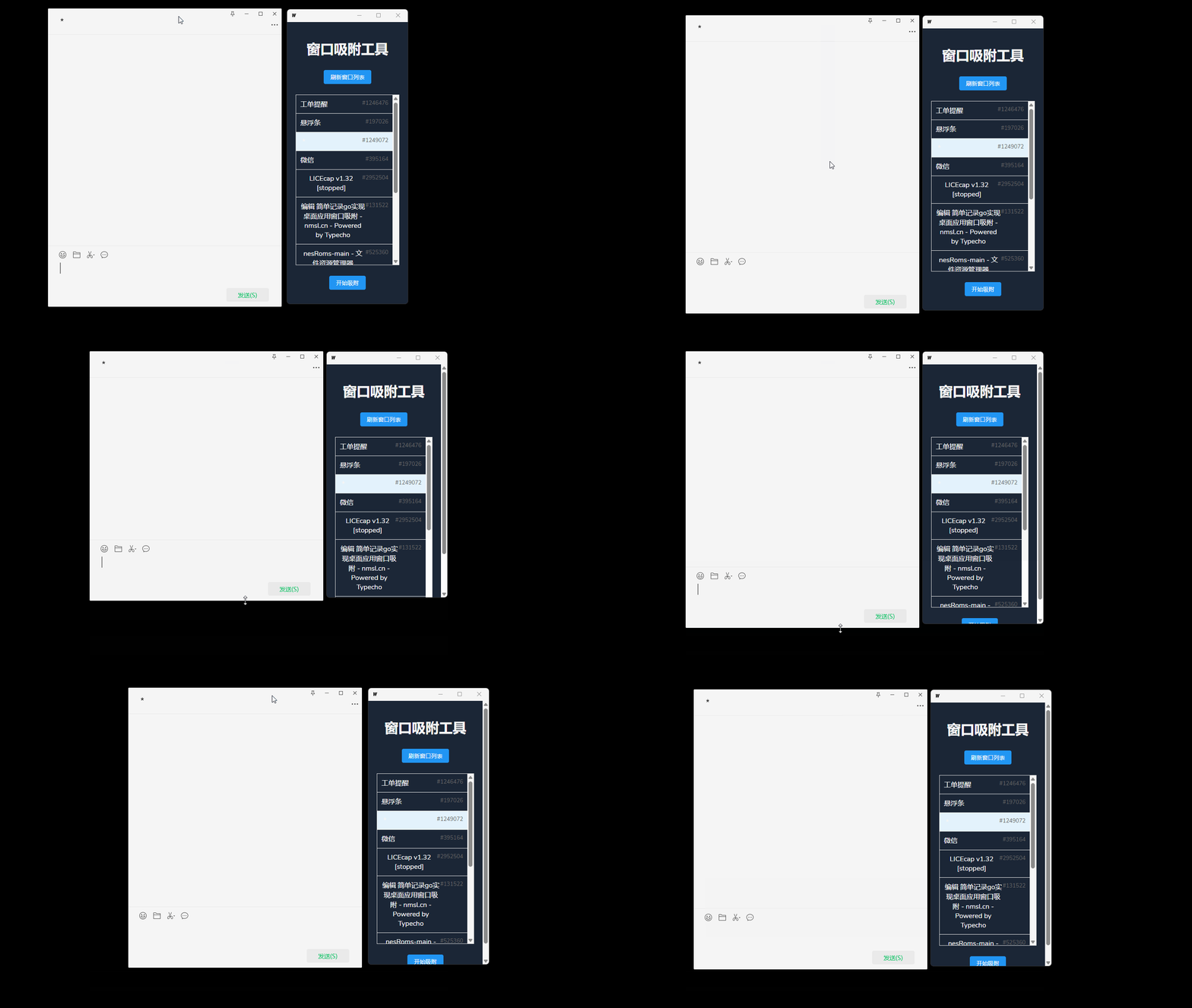
简单记录go语言实现windows桌面应用窗口吸附,类似于“快捷短语软件”可吸附在聊天软件的窗口右侧进行吸附跟随移动..
使用Wails框架实现桌面应用开发,通过Go的syscall和windows包直接调用Windows API
使用了user32.dll中的多个API:
-
EnumWindows - 枚举所有顶层窗口
-
GetWindowTextW - 获取窗口标题
-
GetWindowRect - 获取窗口位置和大小
-
IsWindowVisible - 检查窗口是否可见
使用golang.org/x/sys/windows包进行系统调用,在StartAttach方法中使用了goroutine持续跟踪窗口位置,实现了窗口枚举、标题获取、位置跟踪等功能 ◦ 可以附加到其他窗口并跟随其移动。
效果gif图:
app.go文件代码:
Go
1
2
3
4
5
6
7
8
9
10
11
12
13
14
15
16
17
18
19
20
21
22
23
24
25
26
27
28
29
30
31
32
33
34
35
36
37
38
39
40
41
42
43
44
45
46
47
48
49
50
51
52
53
54
55
56
57
58
59
60
61
62
63
64
65
66
67
68
69
70
71
72
73
74
75
76
77
78
79
80
81
82
83
84
85
86
87
88
89
90
91
92
93
94
95
96
97
98
99
100
101
102
103
104
105
106
107
108
109
110
111
112
113
114
115
116
117
118
119
120
121
122
123
124
package main

import (
"context"
"syscall"
"time"
"unsafe"
"github.com/wailsapp/wails/v2/pkg/runtime" // Wails 框架提供,用于操作窗口等
"golang.org/x/sys/windows"                 // 提供对 Windows 系统调用的支持
)

// 窗口的矩形区域
type RECT struct {
Left   int32 // 矩形左边界
Top    int32 // 矩形上边界
Right  int32 // 矩形右边界
Bottom int32 // 矩形下边界
}

// 定义 Windows 系统相关函数的变量
var (
user32              = windows.NewLazySystemDLL("user32.dll") // 加载 user32.dll,用于调用 Windows 窗口相关函数
enumWindowsProc     = user32.NewProc("EnumWindows")          // 枚举窗口函数
getWindowTextProc   = user32.NewProc("GetWindowTextW")       // 获取窗口标题函数
getWindowRectProc   = user32.NewProc("GetWindowRect")        // 获取窗口矩形区域函数
isWindowVisibleProc = user32.NewProc("IsWindowVisible")      // 判断窗口是否可见函数
)

// 存储窗口信息
type WindowInfo struct {
Handle int    // 窗口句柄
Title  string // 窗口标题
}

// 存储应用程序的状态
type App struct {
ctx        context.Context // 上下文
targetHWND uintptr         // 目标窗口句柄
running    bool            // 是否正在运行
}

// 创建一个新的 App 实例
func NewApp() *App {
return &App{}
}

// Startup 方法,在应用程序启动时调用
func (a *App) Startup(ctx context.Context) {
a.ctx = ctx // 设置上下文
}

// GetWindows 方法,获取所有可见窗口的信息
func (a *App) GetWindows() []WindowInfo {
var windows []WindowInfo // 用于存储窗口信息的切片
// 定义回调函数,用于枚举窗口时调用
cb := syscall.NewCallback(func(hwnd uintptr, _ uintptr) uintptr {
if isWindowVisible(hwnd) { // 判断窗口是否可见
title := getWindowText(hwnd) // 获取窗口标题
if len(title) > 0 {          // 如果标题不为空
windows = append(windows, WindowInfo{ // 将窗口信息添加到切片中
Handle: int(hwnd),
Title:  title,
})
}
}
return 1 // 返回 1 表示继续枚举
})
// 调用 EnumWindows 函数枚举窗口
enumWindowsProc.Call(cb, 0)
return windows // 返回窗口信息切片
}

// StartAttach 方法,开始附加到目标窗口
func (a *App) StartAttach(hwnd int) {
a.targetHWND = uintptr(hwnd) // 设置目标窗口句柄
a.running = true             // 设置为正在运行

// 实时更新窗口位置和大小
go func() {
for a.running { // 当正在运行时
if rect, err := getWindowRect(a.targetHWND); err == nil { // 获取目标窗口矩形区域
// 分两步设置位置和大小
runtime.WindowSetPosition(a.ctx, int(rect.Right), int(rect.Top)) // 设置窗口位置
runtime.WindowSetSize(a.ctx, 300, int(rect.Bottom-rect.Top))     // 设置窗口大小
}
time.Sleep(100 * time.Millisecond) // 每 100 毫秒更新一次
}
}()
}

// StopAttach 方法,停止附加到目标窗口
func (a *App) StopAttach() {
a.running = false // 设置为停止运行
}

// getWindowRect 函数,获取窗口的矩形区域
func getWindowRect(hwnd uintptr) (*RECT, error) {
var rect RECT                          // 创建 RECT 结构体实例
ret, _, err := getWindowRectProc.Call( // 调用 GetWindowRect 函数
hwnd,
uintptr(unsafe.Pointer(&rect)),
)
if ret == 0 { // 如果返回值为 0,表示失败
return nil, err
}
return &rect, nil // 返回矩形区域和 nil 错误
}

// isWindowVisible 函数,判断窗口是否可见
func isWindowVisible(hwnd uintptr) bool {
ret, _, _ := isWindowVisibleProc.Call(hwnd) // 调用 IsWindowVisible 函数
return ret != 0                             // 如果返回值不为 0,表示窗口可见
}

// getWindowText 函数,获取窗口标题
func getWindowText(hwnd uintptr) string {
var text [512]uint16    // 创建一个足够大的缓冲区存储标题
getWindowTextProc.Call( // 调用 GetWindowText 函数
hwnd,
uintptr(unsafe.Pointer(&text[0])),
uintptr(len(text)),
)
return syscall.UTF16ToString(text[:]) // 将 UTF-16 编码的字符串转换为 Go 的字符串
}
全部评论